
Page Rules to Cache Rules
UPDATE: There is a new Cache Rules tutorial as of Nov 2024 – see it instead of this one for the latest code to use.
IMPORTANT
Page Rules on the free Cloudflare version are deprecated and will cease to work on July 1, 2024. Any Page Rules that involve caching will need to be moved to the Caching Rules section.
This tutorial shows how to check your Page Rules and then move them to Cache Rules.
If you have rules outside of controlling cache, they will need to be moved to Configuration Rules. There is currently no tutorial for that, as I don’t have rule examples. Contact me if you need help.
BE SURE to turn off your Page Rules once you have the new rules set up.
Tutorial Sections
- Cheat Sheet – use for the 3 common rules after you watch the video when doing the first one
- Video Tutorial
- Check Current Page Rules – verify all of the rules you currently use
- Wp-login and WP-admin – cache bypass rules
- Cache Everything or Standard – if you need one and how to do it
- Turn Off Page Rules – last step in this process
- Cart and Member Site Type Rules – if you have other things that need to bypass cache
Cheat Sheet
Be sure to watch the full tutorial for how the rules are created the first time you do this.
After that, you can do the following for the 3 common caching rules:
- Name the rule
- Click Edit Expression and input the ones you need below
- Deploy
Bypass Cache for wp-login and wp-admin
NOTE: Be sure to update the domain in both places in this first rule!!!
(http.request.full_uri contains "example.com/wp-login.php") or (http.request.full_uri contains "example.com/wp-admin")Cache Everything
(http.request.full_uri contains "example.com")Video Tutorial
Check Current Page Rules
Log into Cloudflare and click on the domain you wish to update.
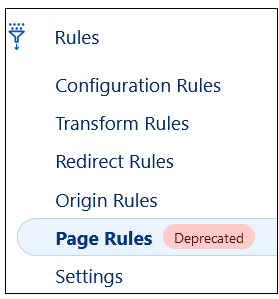
In the left sidebar, click Rules > Page Rules
You should have at least these 3 caching rules, in this order:
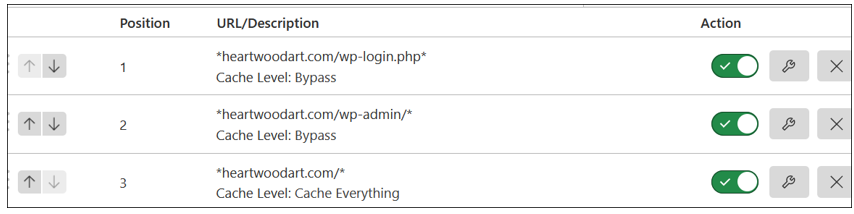
NOTE: The last rule may be set to Cache Standard if you have a cart of membership or something else transactional on your site.
More Rules
Only 3 Page Rules are available on the free version of Cloudflare.
If you have more rules, make note of what they are and if they are cache related, we’ll cover them here.
If they are something other than caching rules, you will want to contact me for help with those.
WP Login and Admin Cache Rules
Once you have documented your rules, for those that are cache related, in the left sidebar, click Caching > Cache Rules.
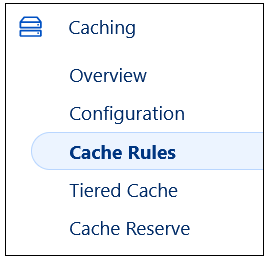
NOTE: Order matters with all rules in Cloudflare, so be sure to add all bypass rules first.
Click the Create rule button.
We are going to combine the first 2 bypass rules into one rule, and you’ll see how the rules are built.
Name the rule wp login and wp admin bypass
- Field: URI Full
- Operator: contains
- Value: example.com/wp-login.php – and change the domain to yours
Note that there are no wildcards and no trailing slash.
Then click the Or button on the right
- Field: URI Full
- Operator: contains
- Value: example.com/wp-admin – and change the domain to yours
Scroll down to the Then section
- Check the radio button for Bypass cache
Scroll to the bottom and click the Deploy button.
Cache Everything or Standard
- If your last Page Rule was set to Cache Standard, then you do not need to add a new rule. Your default setting for cache at Cloudflare is Standard.
- If your rule was set to Cache Everything, then you need to add that rule, which is now called Eligible for cache.
Click the Create rule button
- Field: URI Full
- Operator: contains
- Value: example.com – and change the domain to yours
Scroll down to the Then section
- Check the radio button for Eligible for cache.
Scroll to the bottom and click the Deploy button.
Turn Off Page Rules
If you’re finished, return to Rules > Page Rules and turn them off.
Check your site for a few days, even a week.
And if everything is working, return and delete these rules.
Cart and Member Site Type Rules
These are some page rules that I have for my BlogAid member sites that are on sub-domains. There are 3 rules per sub-domain that are specifically for MemberPress and all need to bypass cache.
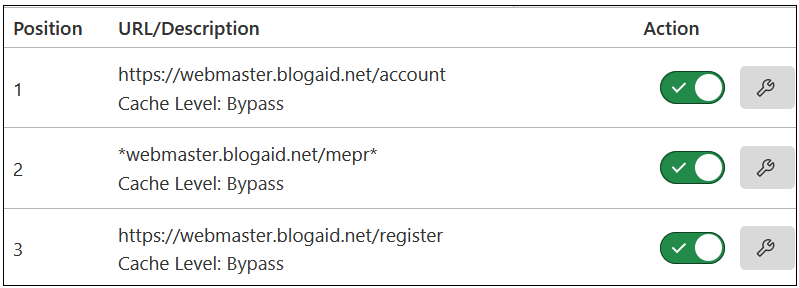
I can combine these per sub-domain into one rule, much the same as we did with the wp-login and wp-admin rules.
And this is why it’s helpful to know how to build a rule from scratch, as you may not have a common Expression to copy.
Here’s a trick.
- Keep your browser tab open to your Page Rules.
- In the left sidebar, hover over Caching and alt-click on your mouse.
- In the flyout, click to open in a new tab.
- In that new tab, in the left sidebar, click Cache Rules.
This way you can copy/paste from one tab to the other as you’re adding the new rules.
In this example, I would create a single rule for all 3 with the following:
- Field: URI Full
- Operator: contains
- Value: my first rule
Then click Or and create the next one. And repeat for all on that sub-domain.
Then Deploy.