
CloudLinux PHP Manager
There are 2 ways to manage PHP versions, extensions, and options.
Here is where you will find the tools in cPanel

Tools:
- cPanel – MultiPHP Manager, and MultiPHP INI Editor
- CloudLinux – Select PHP Version
Why CloudLinux is Better
The CloudLinux way is more secure and allows for stronger partitions between virtual sections on a host server.
This protects individual hosting packages from one another on the same server.
So, we most definitely want to do things the CloudLinux way.
2 Methods
There are 2 ways hosts are implementing this change.
Force CloudLinux
Some hosts are forcing the use of CloudLinux.
When you click the Select PHP Version tool (shown above), you will see this new interface.
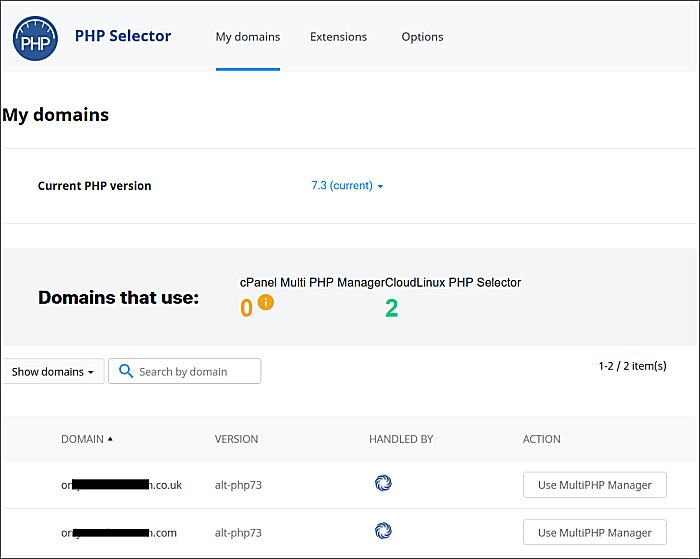
Top Tabs
At the top you see your normal tabs for:
- Domain – where you can select the domain to change
- Extensions – settings for the PHP version
- Options – settings for max execution time, memory limit, upload file size, and more
Current PHP Version
This is the default version set on this hosting package.
But that does not mean that all domains on the package are set to this version. They can now be set individually to any version.
Domains that use
This shows how many domains are using cPanel PHP selector and how many are using CloudLinux PHP selector.
In the above example, both sites are on CloudLinux.
Version Listing
The last sections shows the domains housed in this cPanel.
(FYI, one of these is an add-on domain and only has an .htaccess file to redirect any hits to it to what is now the new main domain. There aren’t two live sites in this same cPanel.)
In the Version column, you can see that both sites are set to PHP 7.3.
In the Handled by column, you can see the CloudLinux logo.
In the Action column, you can see a button for Use MultiPHP Manager, but you can’t click it. That is the cPanel way of doing it.
And this host has chosen to force the use of CloudLinux with no options to revert back to the cPanel way.
Optional CloudLinux
Some hosts are still giving the option to use either cPanel or CloudLinux as the PHP version manager.
When you click the Select PHP Version tool (shown above), you will see this new interface.

As you can see, one of the sites shown is Handeled By cPanel (with the phpfpm accelerator).
The 2nd domain is Handeled By CloudLinux.
On the 1st domain, if you click the Use PHP Selector button, it will switch that domain over to the new CloudLinux PHP manager.
If you switch you will also want to recheck the PHP Option settings.
And of course, recheck the site to ensure there are no issues.
Other Interfaces
If you see other interfaces, please contact me.
- Tell me if this shared hosting or VPS, as VPS is different to begin with.
- Please have screenshots available, and you can attach/send them to the reply email I send you.
Issues and Breaks
Due to some hosts forcing the use of the CloudLinux PHP Manager, some sites are breaking when the switch is made.
This is likely due to a PHP conflict somewhere.
AddHandlers
Check all .htaccess files for a PHP AddHandler directive.
It will likely be at the end and look like this:

It’s likely that needs to be removed, but ask your host first.
Be sure to check for .htaccess files everywhere, including:
- root directory
- public_html directory
- wp-content
- wp-content > uploads
Be sure to open the .htaccess file and check what is in it. Don’t just delete it.
Some plugins like Wordfence and ShortPixel also write to the main .htaccess file and/or create their own in other directories.
.INI Files
You may also have PHP directives in the following files, especially if you’re on a VPS package:
- .user.ini
- .php.ini
These will look like the PHP options found in shared hosting packages for things like max execution time, memory limit, and max file upload size.
It’s likely these files will need to be removed, but ask the host first.
Be sure to open the files first and check what is in them as some plugins, like WordFence, also create these files.
Reported Breaks
The issues I’ve seen reported due to forced CloudLinux being rolled into the server:
- White screen of death when clicking a post to edit
Please do let me know of other issues you encounter or see reported and we’ll add them to the list.